Copyright © 2014 Developed by Shubham Gupta. Powered by Blogger.
Showing posts with label facebook. Show all posts

Saturday, 22 March 2014

Trick To Send Facebook Messages Via Email

Hello friends i don’t know why this week my mind only talk about Facebook and Facebook tricks.


And in today’s post i share a trick to send messages via Email (Gmail,Yahoo,Etc).You know why this trick comes in mind.

The reason is when i am in college.Our college doesn't allow us to use Facebook in college.So to access Facebook or To chat with friends in Facebook we used proxy websites.Or when these proxy websites doesn't work in college we take help from or Gmail account to send messages to our Facebook friend or Girlfriend.
–>
Sorry for disturb in between the post i tel you one thing secret is i used this trick to chat with my Girlfriend.

So How To Send Facebook Messages Via Email:

Step 1:
Open the profile to whom you want to send the message.And see in the address bar.Copy the part of URL shown in the figure.
 Send Facebook Messages Via Email
Step 2:
Now copy that name and the email address of that person is: name@facebook.com. Like in above example sgshubhamgupta398@facebook.com.
Step 3:
Now open your Email account(Gmail,Yahoo etc.).And then compose mail.in “To” section write the email address u generated and send the message.Done.
The person get the message immediately.And get a notification like “Sent From Mail”. 
social media

Trick To Send Facebook Messages Via Email

Posted by Author  |  No comments

Trick To Send Facebook Messages Via Email

Hello friends i don’t know why this week my mind only talk about Facebook and Facebook tricks.


And in today’s post i share a trick to send messages via Email (Gmail,Yahoo,Etc).You know why this trick comes in mind.

The reason is when i am in college.Our college doesn't allow us to use Facebook in college.So to access Facebook or To chat with friends in Facebook we used proxy websites.Or when these proxy websites doesn't work in college we take help from or Gmail account to send messages to our Facebook friend or Girlfriend.
–>
Sorry for disturb in between the post i tel you one thing secret is i used this trick to chat with my Girlfriend.

So How To Send Facebook Messages Via Email:

Step 1:
Open the profile to whom you want to send the message.And see in the address bar.Copy the part of URL shown in the figure.
 Send Facebook Messages Via Email
Step 2:
Now copy that name and the email address of that person is: name@facebook.com. Like in above example sgshubhamgupta398@facebook.com.
Step 3:
Now open your Email account(Gmail,Yahoo etc.).And then compose mail.in “To” section write the email address u generated and send the message.Done.
The person get the message immediately.And get a notification like “Sent From Mail”. 

Saturday, March 22, 2014 Share:
How To Have Your First Name Only On Facebook

Hello friends we all used Facebook. And we all know that Facebook doesn't allow us to write our name in Facebook profile without last name.
If you are searching for a trick which allow us to Write First Name Only in Facebook profile.Then you are in right place.
Because in today’s article i will teach you to enable your first name only in Facebook profile.
Steps To Enable Your First Name Only On Facebook:

Thing’s you will need to enable:-
1. A Brain
2. Mozilla Firefox
3. Little Common Sense
I think you have all the above resources.So without wasting your time lets start with today’s trick.
Step 1: 
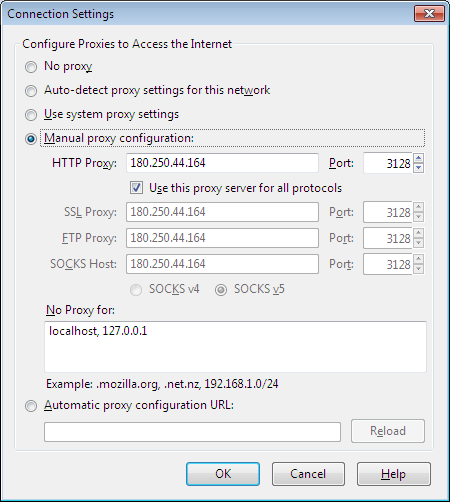
Open Mozilla Firefox. Go to Settings->Network->Configure How Firefox Connect To The Internet(Settings).A window will be appear as shown below.
How To Have Your First Name Only On Facebook
Step 2:
Now tick to the (Use this proxy server for all protocols).Now its time to add proxy address.Here i tell you that we will add Indonesia proxy address (180.250.44.164 Port:3128). As shown in the above screenshot.If this proxy address doesn't work or it is very slow then use any other proxy address which is from Indonesia(Search on Google there are many websites which give you Indonesia proxy address).

Step 3:
After Step 2 click on OK. And now open Facebook.com.And go to Account Settings.Here you will see a Language option.Change the language to “bahasha Indonesia”.

Step 4:
Now its time to enter your first name and save it without enter last name.Done now your Facebook profile shows your first name only.
social media

How To Have Your First Name Only On Facebook

Posted by Author  |  No comments

How To Have Your First Name Only On Facebook

Hello friends we all used Facebook. And we all know that Facebook doesn't allow us to write our name in Facebook profile without last name.
If you are searching for a trick which allow us to Write First Name Only in Facebook profile.Then you are in right place.
Because in today’s article i will teach you to enable your first name only in Facebook profile.
Steps To Enable Your First Name Only On Facebook:

Thing’s you will need to enable:-
1. A Brain
2. Mozilla Firefox
3. Little Common Sense
I think you have all the above resources.So without wasting your time lets start with today’s trick.
Step 1: 
Open Mozilla Firefox. Go to Settings->Network->Configure How Firefox Connect To The Internet(Settings).A window will be appear as shown below.
How To Have Your First Name Only On Facebook
Step 2:
Now tick to the (Use this proxy server for all protocols).Now its time to add proxy address.Here i tell you that we will add Indonesia proxy address (180.250.44.164 Port:3128). As shown in the above screenshot.If this proxy address doesn't work or it is very slow then use any other proxy address which is from Indonesia(Search on Google there are many websites which give you Indonesia proxy address).

Step 3:
After Step 2 click on OK. And now open Facebook.com.And go to Account Settings.Here you will see a Language option.Change the language to “bahasha Indonesia”.

Step 4:
Now its time to enter your first name and save it without enter last name.Done now your Facebook profile shows your first name only.

Saturday, March 22, 2014 Share:
Top 10+ Reason for getting Blocked in Facebook
Friends,

Some times we get blocked by Facebook and we don’t understand that why it has happened or even would've happened with your friends. So, today i’m gonna share  few reasons that why your Facebook account get block, so that you can avoid those stuffs  next time.

Top 10+ Reason for getting Blocked in Facebook


1. If you didn't
 use your real name,face book will find you and block you out.

2. If you joined too many groups.(The maximum limit is 200 groups per user.)

3. If you posted too many messages on a wall or in a group.

4. If you  posted in too many groups,too many user’s walls. (That’s what spammers do,silly.)

5. If you friend-ed too many people.(Not so long ago this was a prime cause of disabled accounts, but Facebook has allowed a maximum of 5000 friends that should protect you from yourself.)

6. If you school/ organization affiliation is doubtful.

7. If you’re poking too many people (Beware the odd FB app that pokes on your behalf.)

8. If you advertised your app on wall posts.

9. If you used duplicate text in multiple messages.

10. If you are under 18 years old and not part of a High School group.

11. If you wrote offensive content.

12. You scraped information off Facebook.
social media

Top 10+ Reason for getting Blocked in Facebook

Posted by Author  |  No comments

Top 10+ Reason for getting Blocked in Facebook
Friends,

Some times we get blocked by Facebook and we don’t understand that why it has happened or even would've happened with your friends. So, today i’m gonna share  few reasons that why your Facebook account get block, so that you can avoid those stuffs  next time.

Top 10+ Reason for getting Blocked in Facebook


1. If you didn't
 use your real name,face book will find you and block you out.

2. If you joined too many groups.(The maximum limit is 200 groups per user.)

3. If you posted too many messages on a wall or in a group.

4. If you  posted in too many groups,too many user’s walls. (That’s what spammers do,silly.)

5. If you friend-ed too many people.(Not so long ago this was a prime cause of disabled accounts, but Facebook has allowed a maximum of 5000 friends that should protect you from yourself.)

6. If you school/ organization affiliation is doubtful.

7. If you’re poking too many people (Beware the odd FB app that pokes on your behalf.)

8. If you advertised your app on wall posts.

9. If you used duplicate text in multiple messages.

10. If you are under 18 years old and not part of a High School group.

11. If you wrote offensive content.

12. You scraped information off Facebook.

Saturday, March 22, 2014 Share:

Sunday, 23 February 2014

make money on facebook an earn money on fb page
After analyzing and researching a lot I have found that one of the most trending Questions nowadays is that“How can one Make Money on Facebook” and “how you can Covert the time you Spend on Facebook to earn money from it”. As a Facebook addict, you definitely had struck with this kind of thought and even searched for it. As I’m also the so-called “Facebook geeks” had asked all my friends much curious to know about this Online Money Making Idea, but none of them able to provide me all the best possible ways to earn money from Facebook. Rumors are that a “Facebook page Admin earns more amount of money if the image/post it shares got more number of likes. That’s why they always ask to like whatever they publish”. Purely this is not true. If you too consider this, than it’s hard to say, but you are living in a society that is full of Blind advisers  and must read my guide on how to Make Money on Facebook.
Everyone knows Facebook and so do you, and that’s why I’m not explaining enough about the Facebook Network. Here I have made a list of 6 Most Popular Ways to Make Money on Facebook and some top best tips so that you can easily earn money from Facebook.

Most Popular Ways to Make Money on Facebook

a)Facebook Page

Every Individual is on Facebook,and each brand is on the Facebook page. Make Money on Facebook Page ideology is very simple. Capture Facebook users as much as you can. This you can do with Like Button of your Facebook Page. More the Number of Facebook Users like your Fan Page more is the reach of your page. With this huge amount of audience, you can Promote any Company Products or Websites, and they can pay you accordingly for just displaying a Banner of theirs on your Page Wall. You can also do affiliate Marketing on your Facebook Page which I have described below to make money from Facebook.You can Read more at  Stunning Ways to Earn with Facebook Pages, Likes and Groups

b)Affiliate Marketing

It’s the idea of showing Ad’s on your Facebook wall. Simply go to some of the popular Affiliate Marketing Companies like Amazon, Commission Junction, Click Bank and register a new account for free. When you complete your sign up process, you have to choose the products which you want to refer to your Facebook Friends.You are provided the code of the product with you affiliate id. Use this code and display it on Facebook. Whenever any person clicks on that Ad and purchases the product from the Company Website, you can make money on Facebook by getting the Commission. If you want to know more about Affiliate Marketing go thorough the given link affiliate marketing programs for websites

c)Make Money by Creating a Facebook App

If you are a Developer and have a pretty good Knowledge of programming Languages then you can use your skills to build a Facebook app with your Unique idea and sell it your Facebook Users. The Strategy to make money on Facebook with this way is to promote your Apps with Facebook Ads and drive the maximum number of users to use your App. Additionally you can apply for CPM Advertising networks like CPAlead to display ads and you will be paid according to that no. of impressions on your App.

d)Create a Facebook blog or an e-book

Facebook today is one of the most gossiping thing around the World. Almost all the people are connected with it, and that’s make Facebook a popular topic on which you can design and launch your Blog. You can Post all the Awesome tips, news,updates, marketing strategies regarding Facebook on your Blog or Website. You can do the same by publishing an e-book and earn with it.

e)Earn Money on Facebook with Existing Facebook Applications

There are some great Apps through which by using them you can easily make money on Facebook. The one I found out recently is Embeepay through which you can recharge your mobile for Free.  App Bank and Live Stock is another such Facebook App though which you can earn money.

f) Expand Your Business

You have an Existing Business, and want to expand it. And I guarantee that you never found this bulk amount of Free audience anywhere. Facebook is always the biggest market place for any kind of Business. You can connect and engage with your Customers by setting up a Facebook Page  or a Group. If you are a Publisher or a Blog Owner then Facebook is just like a Butter for your Blog Income as you can always direct Facebiik Users from your Page to all the published Article on your Website thus Generating a bulk amount of Traffic.
Hope you enjoyed reading this.You can  Subscribe our Weekly Newsletter to get other Important Updates and Essential Tips to make Money Online. If you know any other Source that you might think be added in this post, kindly Share with us in our comments section Below.
Shubham Gupta

Make Money on Facebook Easily With 6 Most Popular Ways

Posted by Author  |  No comments

make money on facebook an earn money on fb page
After analyzing and researching a lot I have found that one of the most trending Questions nowadays is that“How can one Make Money on Facebook” and “how you can Covert the time you Spend on Facebook to earn money from it”. As a Facebook addict, you definitely had struck with this kind of thought and even searched for it. As I’m also the so-called “Facebook geeks” had asked all my friends much curious to know about this Online Money Making Idea, but none of them able to provide me all the best possible ways to earn money from Facebook. Rumors are that a “Facebook page Admin earns more amount of money if the image/post it shares got more number of likes. That’s why they always ask to like whatever they publish”. Purely this is not true. If you too consider this, than it’s hard to say, but you are living in a society that is full of Blind advisers  and must read my guide on how to Make Money on Facebook.
Everyone knows Facebook and so do you, and that’s why I’m not explaining enough about the Facebook Network. Here I have made a list of 6 Most Popular Ways to Make Money on Facebook and some top best tips so that you can easily earn money from Facebook.

Most Popular Ways to Make Money on Facebook

a)Facebook Page

Every Individual is on Facebook,and each brand is on the Facebook page. Make Money on Facebook Page ideology is very simple. Capture Facebook users as much as you can. This you can do with Like Button of your Facebook Page. More the Number of Facebook Users like your Fan Page more is the reach of your page. With this huge amount of audience, you can Promote any Company Products or Websites, and they can pay you accordingly for just displaying a Banner of theirs on your Page Wall. You can also do affiliate Marketing on your Facebook Page which I have described below to make money from Facebook.You can Read more at  Stunning Ways to Earn with Facebook Pages, Likes and Groups

b)Affiliate Marketing

It’s the idea of showing Ad’s on your Facebook wall. Simply go to some of the popular Affiliate Marketing Companies like Amazon, Commission Junction, Click Bank and register a new account for free. When you complete your sign up process, you have to choose the products which you want to refer to your Facebook Friends.You are provided the code of the product with you affiliate id. Use this code and display it on Facebook. Whenever any person clicks on that Ad and purchases the product from the Company Website, you can make money on Facebook by getting the Commission. If you want to know more about Affiliate Marketing go thorough the given link affiliate marketing programs for websites

c)Make Money by Creating a Facebook App

If you are a Developer and have a pretty good Knowledge of programming Languages then you can use your skills to build a Facebook app with your Unique idea and sell it your Facebook Users. The Strategy to make money on Facebook with this way is to promote your Apps with Facebook Ads and drive the maximum number of users to use your App. Additionally you can apply for CPM Advertising networks like CPAlead to display ads and you will be paid according to that no. of impressions on your App.

d)Create a Facebook blog or an e-book

Facebook today is one of the most gossiping thing around the World. Almost all the people are connected with it, and that’s make Facebook a popular topic on which you can design and launch your Blog. You can Post all the Awesome tips, news,updates, marketing strategies regarding Facebook on your Blog or Website. You can do the same by publishing an e-book and earn with it.

e)Earn Money on Facebook with Existing Facebook Applications

There are some great Apps through which by using them you can easily make money on Facebook. The one I found out recently is Embeepay through which you can recharge your mobile for Free.  App Bank and Live Stock is another such Facebook App though which you can earn money.

f) Expand Your Business

You have an Existing Business, and want to expand it. And I guarantee that you never found this bulk amount of Free audience anywhere. Facebook is always the biggest market place for any kind of Business. You can connect and engage with your Customers by setting up a Facebook Page  or a Group. If you are a Publisher or a Blog Owner then Facebook is just like a Butter for your Blog Income as you can always direct Facebiik Users from your Page to all the published Article on your Website thus Generating a bulk amount of Traffic.
Hope you enjoyed reading this.You can  Subscribe our Weekly Newsletter to get other Important Updates and Essential Tips to make Money Online. If you know any other Source that you might think be added in this post, kindly Share with us in our comments section Below.

Sunday, February 23, 2014 Share:
Proudly Powered by Blogger.
back to top